
Staff / Students
Staff / Students
All former students who wish to request their academic transcript are required to complete the Transcript Registration process before applying for a transcript.
Please read the instructions below carefully and ensure that all information and documents you provide are accurate and complete.
Visit the Transcript Registration page and complete the registration form.
During registration, you will be required to provide:
Provide your personal information, including:
Important: Ensure that the name and other personal information you provide correspond with your school records.
Provide your academic information as requested on the registration form, including relevant details such as:
Important: Carefully verify your academic information before submitting the registration form.
After successfully completing your Transcript Registration, a password will be generated automatically and sent to the email address you provided during registration.
Important: Keep your login details safe. Do not share your password with another person.
After receiving your password, return to the Transcript Portal and log in using your registered email address and the password sent to you.
Your dashboard allows you to:
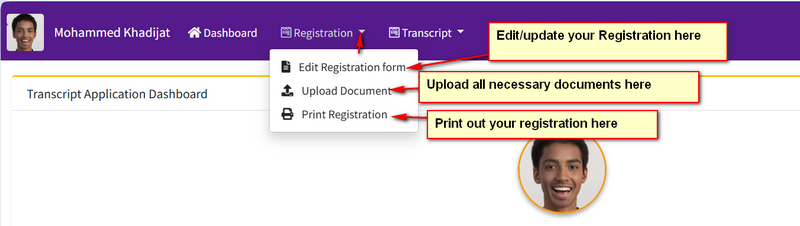
After logging in, carefully review all the information you supplied during registration.
If any information needs to be corrected or updated, make the necessary changes before proceeding.
Please ensure that your information is accurate before applying for a transcript.
You are required to upload the following documents to your Transcript Dashboard.
| Document | Requirement |
|---|---|
| Passport Photograph | Compulsory |
| School Certificate | Compulsory for 2021 Set and Above |
| Testimonial | Compulsory |
| NMCN Certificate | Compulsory |
| NMCN License | Compulsory |
| Organization/Institution Form | Optional |
Upload a recent, clear passport photograph.
Applicants from the 2021 set and above are required to upload their School Certificate.
Upload a clear copy of your Testimonial.
Upload a clear copy of your NMCN Certificate.
Upload a clear copy of your valid/relevant NMCN License.
If the organization or institution you want your transcript sent to has provided you with a transcript request/form, you may upload it.
This document is optional.
Before proceeding, carefully check that:
Do not upload blurred, incomplete, wrong or unrelated documents.
After completing your registration and uploading the required documents, you can print your Transcript Registration from your dashboard.
We recommend that you keep a copy of your printed registration for your records.
After completing your Registration, you can proceed to apply for your transcript.
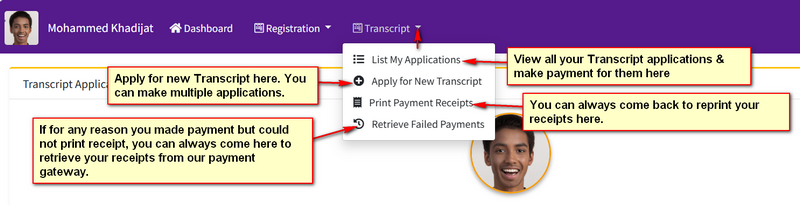
Click the "Transcript dropdown" and select "Apply for New Transcript" from your dashboard and provide the details of the organization or institution to which the transcript is to be sent.
Carefully enter the recipient's information.
A transcript application is made for a specific organization or institution.
If you need your transcript sent to different organizations or institutions, you must submit a separate transcript application for each organization or institution.
You can therefore apply for transcripts multiple times, provided each application is for a different organization or institution.
After submitting your transcript application, proceed to make the required payment through the available payment option on the portal.
Before making payment, carefully review your application details and confirm that the recipient organization/institution information is correct.
Important: Ensure that your payment is made only through the official Transcript Portal payment process.
After a successful payment, return to your dashboard and print your Transcript Application Payment Receipt.
Keep the receipt safely as evidence of your payment and transcript application.
All information supplied during registration and transcript application must be accurate and correspond with your official school records.
Your login password will be sent to the email address provided during registration.
Make sure you have access to the email address before completing your registration.
If you do not immediately receive your password, check your Spam/Junk/Promotions folder before contacting support.
Your email address and password are required to access your Transcript Dashboard. Do not share your login details with anyone.
All uploaded documents must be clear, readable and relevant.
Before submitting a transcript application and making payment, carefully verify the name and details of the organization/institution that should receive your transcript.
If you want your transcript sent to more than one organization or institution, create a separate transcript application for each recipient.
Keep copies of your Transcript Registration and Payment Receipt for future reference.
1. Register for Transcript
↓
2. Provide Biodata & Academic Record
↓
3. Receive Password by Email
↓
4. Login to Transcript Dashboard
↓
5. Review/Update Your Record
↓
6. Upload Required Documents
↓
7. Print Transcript Registration
↓
8. Apply for Transcript
↓
9. Provide Recipient Organization/Institution Details
↓
10. Make Payment
↓
11. Print Payment Receipt
If you experience any difficulty while registering, uploading your documents, applying for a transcript or making payment, please contact the designated Edo State College of Nursing Sciences Transcript Portal Support Team:
Official email address for enquiries( records@edocns.edu.ng)
For support & quick enquiries (+2347031477279 WhatsApp only)
Please do not create multiple registrations if you are experiencing a technical problem. Contact support for assistance.